
Introduction: Why Ergonomics Programs Matter in the Workplace
Many workplaces still treat sore backs and aching wrists as the cost of doing business. They're not.
Repetitive motion, forceful exertion, awkward postures, contact stress, vibration, prolonged sitting, and poorly designed workstations all drive musculoskeletal disorders (MSDs). The damage builds slowly, one shift at a time.
For US employers, the fallout goes beyond an employee's discomfort. Restricted work, absenteeism, workers' compensation exposure, turnover, and declining morale all hit the bottom line.
Musculoskeletal disorders remain one of the most common categories of workplace injury. Current federal injury data shows hundreds of thousands of MSD-related cases requiring days away from work each year.
This guide breaks down what a real ergonomics program looks like: how to define one, the components that make it work, how to roll it out, and how to measure results across onsite, office, remote, and hybrid teams.
Key Takeaways
- Treat ergonomics as a continuous program, not a one-time assessment, training session, or equipment purchase
- Combine worker input, hazard assessment, higher-level controls, training, leadership support, and ongoing measurement
- Connect ergonomics to operations, engineering, HR, wellness, and broader safety goals
- Pilot one high-risk task, department, or site first, then scale what works
What Are Workplace Ergonomics Programs?
A workplace ergonomics program is a structured process for identifying, evaluating, and controlling physical risk factors so the work, tools, equipment, and environment fit the people doing the job—not the other way around.
NIOSH's guidance on ergonomics programs frames a complete program around:
- Identifying risk factors
- Training and involving workers and management
- Collecting health evidence
- Implementing controls and evaluating results
- Supporting recovery and sustaining long-term commitment
That last part is what separates a real program from a workstation checklist. A checklist tells you whether a chair adjusts. A program addresses job design, equipment selection, workflow, employee behavior, early symptom reporting, and who's accountable when something needs to change.
Ergonomics Looks Different Across Settings
Risk factors shift depending on where the work happens:
- Manufacturing, warehousing, and food processing: lifting, pushing, pulling, line work, packing, reaching, and material handling
- Office, remote, and hybrid work: workstation setup, prolonged sitting, monitor and input-device position, limited movement, and uneven home-workspace conditions
A program addressing only one side of that list misses a large share of the workforce, especially in hybrid organizations juggling both.
Body, Behavior, and Environment
At DORN, we look at ergonomics through the Body, Behavior, and Environment (BBE) model—three linked factors that determine whether a job stays safe to perform day after day.
- Body: hands-on therapy, training, and direct care for non-acute injuries, chronic pain, or work-related stress
- Behavior: on-site coaching, technique observation, self-care education, and how people actually perform tasks
- Environment: workstation, department, and organization-level design
None of the three works well alone. A redesigned workstation still won't prevent injuries if people never change how they move. Technique coaching hits a wall when the equipment forces bad posture. Programs that address all three hold up better over time than ones built around a single fix.

Why Should Employers Invest in an Ergonomics Program?
Most MSDs don't appear overnight. They build from repeated exposure to the same risk factors, which means there's usually a window to intervene before discomfort turns into a recordable injury or a restricted-duty case. Catching that window is the entire point of an ergonomics program.
What Employers Gain
- Reduced injury-related disruption to schedules, staffing, and production
- Improved productivity and quality, since awkward or fatiguing tasks tend to slow workers down and increase errors
- Stronger morale and retention when employees see management act on their concerns
- More informed decisions on equipment, layout, and process changes before problems get built into the job
DORN's own program data reflects this pattern. Organizations running customized ergonomic interventions have reported productivity gains as high as 59%, absenteeism reductions near 40%, and workers' compensation cost reductions around 60%. Average ROI has reached 600% across program clients.
Dow Chemical's ten-year ergonomics effort, launched in 2000 for 1,250 employees, simplified discomfort reporting and recorded a 64% decrease in measurable workplace risk factors over the life of the program.
The financial stakes are real too. Employers report spending an average of $40,000 per injury in direct and indirect costs, before factoring in retraining, overtime coverage, or lost production time.
What Employees Gain
- Less physical strain and better day-to-day comfort
- A real seat at the table when safety decisions get made
- Confidence that reported concerns will actually get addressed
That last point matters more than it sounds. Employees who believe nothing will change tend to stop reporting discomfort, and the data an employer needs to catch problems early disappears with it.
Framing Ergonomics Correctly
Ergonomics is a worker-well-being priority and an operational improvement process at the same time. A workstation redesign that prevents a shoulder injury also tends to reduce rework, speed up the task, and cut turnover-related retraining costs.
Academic research on ergonomic-intervention economics is still developing, and published ROI figures vary by program design and implementation. Track your own before-and-after data rather than assuming an industry-wide number applies to your facility.
Building Blocks of an Effective Workplace Ergonomics Program
Six elements show up again and again in programs that actually stick. Six elements show up again and again in programs that actually stick. Treat them as a system: weak ownership, thin data, or one-off training usually undoes the rest.
Leadership and Ownership
Executives approve budget. EHS leaders design and drive the process. Operations, engineering, HR, and supervisors each own a piece of execution, and employees provide the on-the-ground reality check. Ergonomics works best when it's built into purchasing decisions, facility design, and new-equipment evaluations, not bolted on afterward.
Identify and Prioritize Risks
Combine multiple data sources rather than relying on one:
- Job observations and task analysis
- Employee interviews and symptom surveys
- Injury and workers' compensation records
- Absenteeism data and near-miss reports
Rank findings by severity, frequency, duration, how many workers are exposed, and how feasible a fix would be. A task injuring two people occasionally ranks differently than one exposing forty people daily.
Apply the Hierarchy of Controls
OSHA's hazard-control framework ranks interventions from most to least effective: elimination, substitution, engineering controls, administrative controls, and personal protective equipment.
Engineering fixes—adjustable work heights, lift assists, better tool and material placement—solve the problem at the source. Training and administrative changes still matter, but they shouldn't be the only line of defense.

Worker Participation and Reporting
The people doing the job every day spot risks a walkthrough misses. Build a non-punitive channel for reporting pain, discomfort, and near misses, and let employees test proposed fixes before rolling them out facility-wide.
Role-Specific Training
Different roles need different training:
- Employees need hands-on demonstrations and symptom-recognition basics
- Supervisors need to spot risk during daily operations, not just formal assessments
- Engineers and procurement teams need to understand ergonomic requirements before they buy or design equipment
Effective programs pair classroom instruction with floor-level coaching. DORN's ErgoAware training, for example, helps supervisors catch hazardous postures, excessive reaching, and risky methods in the moment—not months later in a review.
Document and Define Success
Written responsibilities, assessment methods, corrective-action workflows, and review schedules keep a program running after rollout excitement fades.
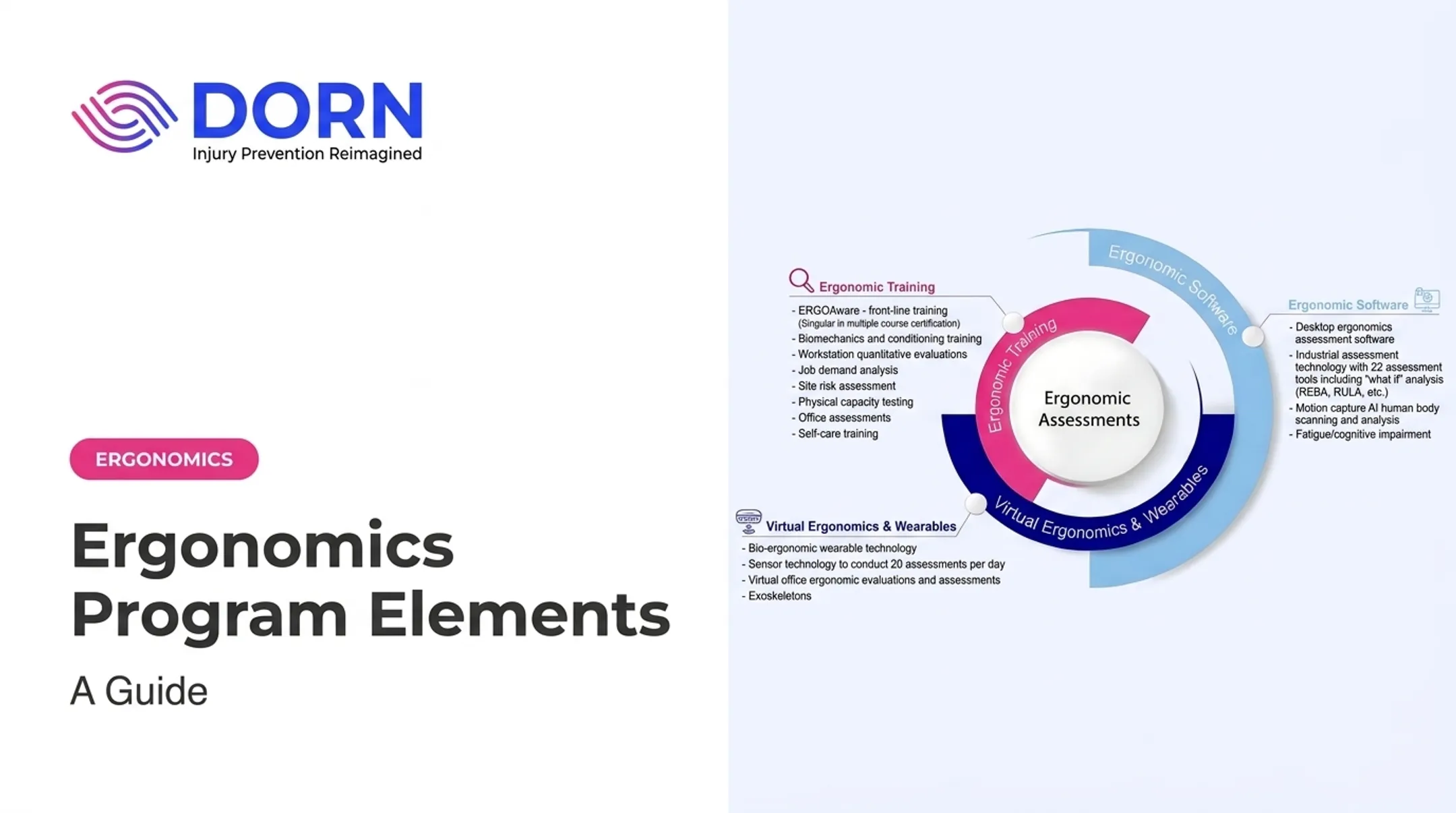
Organizations without in-house ergonomics specialists often bring in outside support to build that foundation. DORN's ergonomic assessments and Certified Industrial Ergonomic Evaluators partner with internal teams to document risks, controls, and success metrics from the ground up.
How to Implement an Ergonomics Program: A Practical Step-by-Step Process
Rolling out a full program all at once rarely works. A phased approach gives you real data and a repeatable template.
Start with a baseline and pick one priority. Review injury, claims, absenteeism, turnover, quality, and employee-feedback data to choose one department, job, or location as a pilot. Multi-site organizations can set standards at one site, then adjust for local equipment, processes, and workforce differences.
Assess the task and the workplace. Observe the job under normal conditions. Document posture, force, repetition, reach distance, load, vibration, contact stress, workstation design, and duration. Talk to the workers; their input often surfaces risks a walkthrough alone would miss.
Select and implement controls. Separate quick work-practice fixes from longer-term engineering, layout, or procurement changes. Involve affected employees in testing, and watch for fixes that shift strain to another body area or worker group.
Train, communicate, and reinforce. Provide task-specific instruction on safe methods, equipment adjustment, and reporting through toolbox talks, supervisor coaching, onboarding, and refreshers. Include remote and hybrid employees from the start, not as an afterthought.
Verify effectiveness and refine. Set a follow-up date to confirm controls are installed, used correctly, and workable under real production conditions. Use feedback and outcome data to adjust, then replicate what worked in other departments.
Bring in specialist or technology support where it helps. DORN's motion-capture and wearable technology can add objective data, but work best as a supplement to structured assessment and worker engagement. In one DORN pilot across four sites, engineering changes alone produced modest results until body-mechanics coaching and posture training were added.

That combination only paid off after workers had time to adapt. In the same pilot, risk scores on several tasks rose slightly right after environmental changes because workers hadn't yet learned the new setup. Controls need a runway. Budget time for that adjustment period instead of expecting instant results the day new equipment shows up.
How to Measure and Improve Program Performance
To know whether your ergonomics program is working, track two categories of data—not just injuries after the fact.
| Indicator Type | Examples |
|---|---|
| Lagging | MSD cases, restricted-duty events, workers' comp costs, OSHA-recordable data, absenteeism, turnover |
| Leading | Completed assessments, corrective-action closure, training completion, worker participation, reported concerns, follow-up verification |
Lagging vs. leading indicators
Lagging indicators show what already happened. Leading indicators show whether the program is working before an injury appears in the numbers.
Build a fair baseline
Establish a baseline before you change anything. Compare results the same way over time, and adjust for headcount, production volume, staffing, and reporting practices.
A drop in reported discomfort looks like progress until you learn fewer people are reporting—not that fewer people are hurting.
Watch operational metrics too
Give equal weight to operational signals:
- Quality issues and rework
- Throughput and downtime
- Task completion rates
- Employee engagement and retention
These figures often shift before injury data does, and leadership usually trusts them more when you defend continued investment.
Set a review cadence—and keep it
- Leadership reviews at a regular interval
- Ongoing worker feedback channels
- Annual program reassessment
- Reassessment whenever a process, facility, equipment, or staffing change occurs
One strong quarter is not proof the program worked. Treat any drop in discomfort or injuries as real only when reporting participation and control adoption hold steady or rise with it.
Common Mistakes and Practical Ergonomics Project Ideas
Most ergonomics programs don't fail from lack of effort. They fail from a handful of repeatable mistakes.
Where Programs Go Wrong
- Treating ergonomics as an EHS-only responsibility instead of a cross-functional effort
- Leaning on generic lifting advice instead of task-specific fixes
- Purchasing equipment before assessing whether it actually solves the task's problem
- Training once and never following up
- Ignoring worker input on what's actually practical
- Measuring only injury counts instead of leading indicators too
Project Ideas by Environment
Manufacturing and food processing:
- Adjust work heights to a hip-to-chest range
- Improve tool selection and material presentation
- Test job rotation to reduce repetitive reaching
Warehousing and distribution:
- Review pallet and shelf heights, capping stack height where feasible
- Reduce floor-level handling with lift tables or turntables
- Assess pushing versus pulling demands; pushing is almost always the safer option
Office, remote, and hybrid work:
- Offer workstation self-assessments for remote employees
- Adjust monitor and input-device placement
- Encourage regular position changes and create a clear channel for requesting equipment support

Pick one clearly defined task with a measurable objective before expanding further. Document the intervention, employee feedback, implementation status, and follow-up findings so you can replicate what works.
Ergonomic fixes should address the source of the risk. Asking employees to "just be more careful" shifts the burden onto the person instead of the workstation, tool, or process creating the risk.
Frequently Asked Questions
What are ergonomic programs?
Ergonomic programs are ongoing systems for identifying and controlling work-related physical risks. They combine hazard assessment, worker participation, training, workplace design changes, and continuous follow-up rather than a single fix.
How can I create an ergonomic workspace?
Set work height and reach for neutral posture, use adjustable chairs, benches, or material-handling aids, and place tools, monitors, and controls to limit awkward positions. Build in movement or task variety during the shift, and get a professional ergonomic assessment if discomfort or injury trends continue.
Who can develop an MSD?
Anyone exposed to relevant risk factors can develop a musculoskeletal disorder. Manual-labor, office, remote, healthcare, and service workers are all included, since repetitive strain and awkward posture don't discriminate by job title.
What are the 5 components of ergonomics?
Most frameworks include risk identification, assessment, control selection, training and worker participation, and evaluation or continuous improvement. Different organizations may label or group these steps slightly differently.
How much does an ergonomic evaluation cost?
Cost depends on workplace size, number of tasks or locations, assessment complexity, travel, technology used, and whether follow-up support is included. Request a scoped quote based on your specific sites and goals.
What are some ideas for ergonomic projects?
Examples include workstation redesign, material-handling improvements, lift-assist trials, work-height adjustments, task-rotation analysis, remote-workstation reviews, and structured follow-up measurement after any change.